Cargando...

 BetaBeta
Este curso aún no está disponible en Espanol, así que estás leyendo el original en English.
By the end of the workshop you will have handed a Solana project to the kit's specialists, one at a time, from the first research question to the deploy. This lesson installs the kit that carries them and shows you how one of them is built. Around fifteen minutes.
The Solana AI Kit is a folder of configuration for Claude Code, maintained by Superteam Brasil at github.com/solanabr/ai-kit. As read on 2026-11-09 from the kit's main branch at commit 0a2f0d9, it carries 15 agents, 54 slash commands, a hub of skills, four MCP servers and a firewall. The installer fetches main until a release newer than v2.4.0 is tagged, and the v2.4.0 tag itself holds 32 commands and none of the workflow chain in lesson 7, so expect the counts in this course to move. This course is about the agents. An agent is a specialist prompt: a markdown file with a name, a one-line description, a model, the references it must read before working, the mistakes it must not make, and a table of who it hands work to. Claude Code starts one as a subagent when your request matches its description, or when you name it. Naming it is the habit this course teaches.
claude
Set up a Solana AI Kit workshop project for me. Show me each command before you run it, and stop if a step fails.
1. Create a folder named kit-workshop inside the current directory and initialise an empty git repository in it.
2. Download https://aikit.superteam.codes/install.sh to a temporary file, read it, and tell me in a few lines what it writes, what it adds to .gitignore and which plugin it installs.
3. Run that file with bash from inside kit-workshop, so the kit installs into that folder and nowhere else, and show me the closing box it prints.
4. List kit-workshop/.claude/agents and tell me how many files are in it.
5. Do not start Claude Code yourself. Tell me to exit this session, cd into kit-workshop and run claude there.
The closing box says Installation complete, names the firewall tier (Relaxed), and lists next steps. What landed: .claude/, CLAUDE.md, .mcp.json, .env and .env.schema in the folder, with .claude/, .mcp.json, .gitmodules and .safe-ai-skill/ added to .gitignore and CLAUDE.md and .env.schema left tracked, plus the safe-ai-skill security plugin installed through the claude CLI. The installer asks you nothing. If you would rather type it yourself, the same five steps are mkdir and git init, curl -fsSL of that address into a file, less on the file, then bash on it from inside the folder.
cd kit-workshop && claude
Claude Code asks once whether to start the four MCP servers in .mcp.json. Approve them. Then type:
/doctor
Thirteen numbered checks, each OK, WARN, FAIL or n/a, with one fix-it command per failure. Claude Code ships a /doctor of its own, so if what comes back is not thirteen numbered checks, pick the project command from the slash menu, the one that reads .claude/commands/doctor.md. Today the Solana CLI line may read FAIL and the keys may read empty. Both are fine for the next lesson. Lesson 3 is where Rust, Anchor and the Solana CLI enter. /doctor has already printed the Solana CLI install command, and it prints the Rust and Anchor ones once the project holds an Anchor workspace.
.claude/agents/solana-architect.md in your editor, or ask for it inside Claude Code:Show me .claude/agents/solana-architect.md in full, unchanged.
Read it as a job description. The header carries the name, the description Claude Code matches against, and model: opus, which every kit agent sets whatever your session runs on. Then the sections most of the fifteen files share: what to read before working (links into the solana-dev pack and the kit's own skills), the details that are easy to get wrong (here: seeds are permanent, shared writable accounts serialize every transaction, admin powers behind a multisig), Handoffs (which agent gets which follow-up, a table in this file and a list in the others), and a closing section, Output in the architect and the researcher, Before handing back in the engineers. That closing section is the one to hold onto: it tells you what you are owed when the agent finishes.
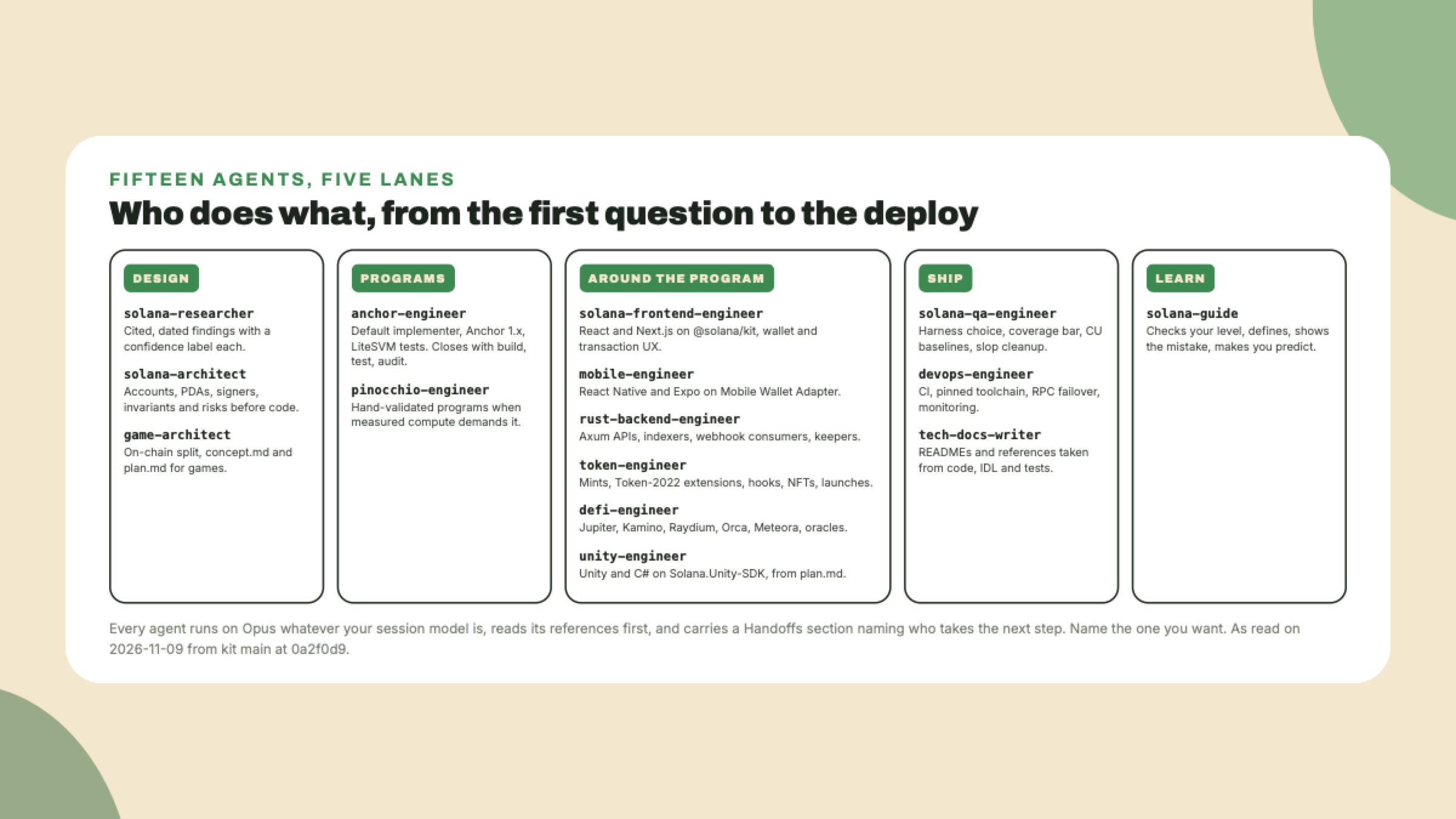
The lessons follow those lanes with one example project: Stamp, a loyalty card for a coffee shop, where a customer earns a stamp per purchase and ten stamps buy a coffee. The shop and the customer each hold a wallet. It is a small idea on purpose, so that every agent gets a turn on something you can picture.
Use the solana-researcher agent to tell me, in three sentences with a cited source each, what Token-2022 is and when a small shop would want it over the classic token program.
You should see the agent start, then a short answer with links and a confidence label per finding, which is the output shape its file demands. The reply ends with up to five labelled lines, Verified, Decisions made, Decisions needed, Assumptions and Next owner, because the house rules ask every agent for them and a hook sends an agent back once when one is missing. You will see those five lines after every agent in this course. If Claude answers from memory with no agent and no links, say "use the agent" and ask again.
ls .claude/agents lists fifteen files and /doctor ran./doctor passes Node 18, but the context-mode server among the four defaults wants 22.5 or newer, so that is the version to have..env holds keys, .mcp.json holds config. The Helius server reads its key from the environment, and /setup-mcp appends it for you. Nothing today needs a key.The kit installs into the folder the installer runs from, and its agents are markdown job descriptions with a model, references, pitfalls, handoffs and a required output shape. You get the specialist you ask for by name.
Next lesson the researcher and the architect take Stamp from three lines of idea to a design with named accounts, and you keep the design file, because every later agent reads it.
Inscríbete para hacer el quiz
El quiz es parte del curso: inscríbete para responderlo, seguir tu progreso y ganar XP.